ELLIPAL Titan: a secure wallet with extensive cryptocurrency support
Choosing a reliable cold wallet is an important step for anyone who wants to take control of their cryptocurrency and store digital assets independently. The ELLIPAL Titan is a hardware wallet designed for users who prioritise security, broad cryptocurrency compatibility and offline storage. Its main strengths include an extensive list of supported coins and tokens, an easy initial setup, completely air-gapped transaction signing and a physical protection mechanism designed to erase private keys if the device is forcibly opened.
The wallet also offers staking for selected popular cryptocurrencies, allowing users to explore additional blockchain services without giving up the benefits of hardware-based storage. However, it has some limitations: its application works only on smartphones, its many functions can initially seem complicated to beginners, and firmware updates require a microSD card.
In this review, we examine the ELLIPAL Titan’s main features, advantages and disadvantages to help you decide whether it is the right cold wallet for cryptocurrency.
| ✅ Pros | ❌ Cons |
| Excellent security, air gapped | No desktop app (requires a smartphone) |
| Robust, durable | No debit card available. If you want to spend funds, you need to move them |
| Great choice of coins on the app, more than 10000, across 45 blockchains | Buying tokens directly on the app via a debit card carries fees |
| Transactions are approved with QR codes | Transactions take a little time to scan the codes |
| Staking of popular coins is available | Swapping is charged with fees |
What Is the ELLIPAL Titan?
The ELLIPAL Titan is a hardware wallet designed to keep private keys offline and allow users to manage their digital assets through a dedicated mobile application. Unlike some conventional hardware wallets, it does not connect to a computer or smartphone through USB or Bluetooth. Instead, it uses QR codes to exchange transaction information.
The Titan 2.0 features a large 4-inch colour touchscreen, a metal-sealed body and a secure element. Its design is intended to make the device both practical and resistant to physical tampering. Users can check transaction details and approve operations directly on the hardware wallet, while the smartphone acts as the interface for managing the portfolio.
This approach makes the Titan particularly interesting for people who want a dedicated offline device rather than a wallet that remains electronically connected to other equipment.
Extensive Support for Coins and Tokens
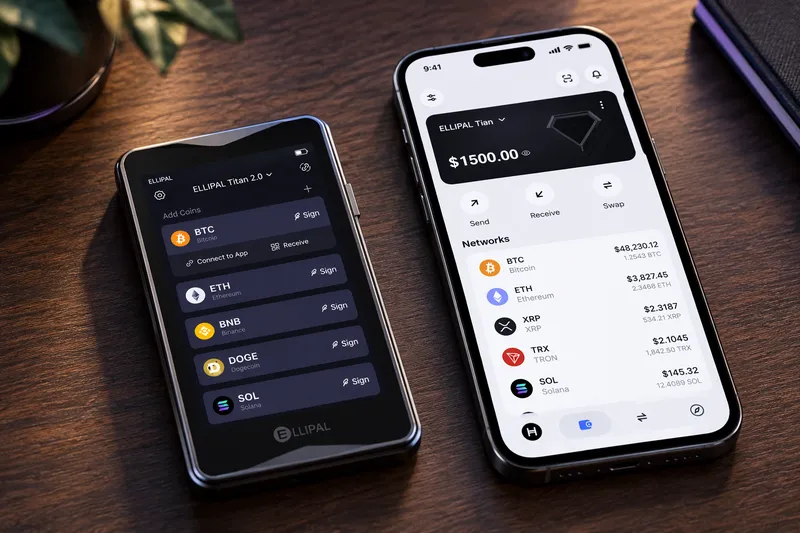
One of the most attractive features of the ELLIPAL Titan is the large selection of cryptocurrencies available through its application. The ELLIPAL ecosystem advertises support for more than 10,000 tokens across over 45 blockchain networks.
This includes popular cryptocurrencies such as Bitcoin, Ethereum, XRP, Solana, Stellar and BNB, as well as numerous stablecoins and tokens operating on different networks.
For investors who own several digital assets, this extensive compatibility is a considerable advantage. Instead of using several different wallets, they can manage a diversified cryptocurrency portfolio through one application.
The wallet is also interesting for people looking for a secure hardware wallet for XRP, since it is among the supported assets. However, it is important to distinguish between storing a cryptocurrency and using every available service associated with it. A token may be supported for receiving and sending without necessarily being eligible for staking or swapping.
The application also provides portfolio monitoring, transaction management and access to additional services such as cryptocurrency swapping. Availability may depend on the specific asset, blockchain and third-party provider.
Easy setup and a practical design
Setting up the ELLIPAL Titan is relatively straightforward. After downloading the official application, users can create a new wallet on the hardware device and generate a recovery phrase. This phrase is essential because it allows the wallet to be restored if the device is lost, damaged or replaced.
The smartphone application is then paired with the Titan using QR codes. The phone provides the interface for managing cryptocurrency, while the hardware device remains offline and signs transactions.
The large touchscreen is another positive feature. Compared with smaller hardware wallets that rely on physical buttons, the Titan makes it easier to navigate menus, review addresses and inspect transaction information. Its metal construction also gives it a solid, durable feel.
Nevertheless, beginners should expect a short learning period. The initial setup is not particularly difficult, but the number of supported networks, tokens and additional functions can make the application seem overwhelming at first. Once users become familiar with the different sections, everyday operations become easier.
Air-gapped technology and strong security
Security is arguably the most important reason to consider the ELLIPAL Titan. Its air-gapped architecture means that the device does not use Wi-Fi, Bluetooth or NFC and does not establish a USB data connection with a computer. Instead, transactions are authorized by scanning QR codes.
When a user wants to send cryptocurrency, the mobile application prepares the transaction and displays a QR code. The Titan scans this code, processes the information offline and allows the user to inspect and approve the transaction on its own screen. It then displays another QR code containing the signed transaction, which the application scans and broadcasts to the blockchain.
This separation reduces the potential attack surface by avoiding direct electronic connections between the signing device and internet-connected equipment.
The Titan also includes a secure element designed to protect sensitive information. Another notable feature is its physical tamper protection. If the device detects an attempt to forcibly open or disassemble its sealed body, it is designed to erase the stored private keys automatically. This mechanism helps protect against certain physical attacks and makes unauthorised access more difficult.
Of course, no hardware wallet solution can guarantee absolute security. Users must still protect their recovery phrase, verify recipient addresses and transaction details, and avoid phishing websites or suspicious applications. The recovery phrase should never be shared or stored carelessly.
Staking Popular Cryptocurrencies
The ELLIPAL application also provides staking functionality for selected cryptocurrencies. This is an interesting feature for investors who want to explore blockchain-based rewards while keeping control of their assets through a hardware wallet.
Supported staking options include several popular cryptocurrencies and networks, such as Ethereum, Cardano, Cosmos, Tezos, Polkadot and Kusama. However, staking is not available for every coin or token supported by the device. Less widely used cryptocurrencies may be available for storage and transfers but have no staking option. If you look for staking more exotic coins, you should probably create other specific hot wallets, and not connect them to the Ellipal.
Staking conditions, reward rates and availability depend on the individual blockchain and service provider. Some networks also impose unbonding periods, meaning that users may have to wait before transferring their assets after unstaking. Rewards are not guaranteed, and the market value of the staked cryptocurrency can fluctuate.
Physical Design, Dimensions and Durability
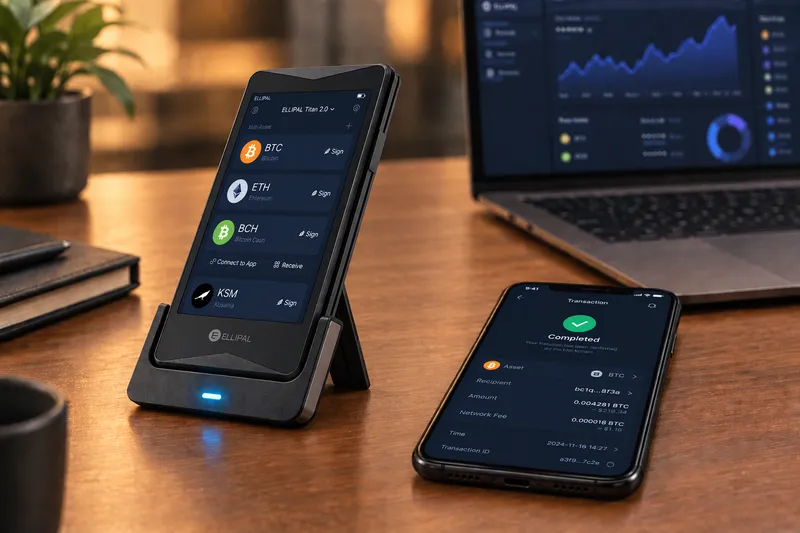
The ELLIPAL Titan has a solid, compact design, featuring a 4-inch colour touchscreen and a metal-sealed body that gives the device a reassuringly robust feel. Its dimensions are approximately 118 × 66 × 9.7 mm, and it weighs around 140 grams, making it portable enough to carry or store safely when not in use. Unlike lightweight plastic devices, its metal construction is designed to provide additional physical protection.
Durability is another positive aspect: after three years of use, our device continues to work properly, with no significant problems affecting its everyday operation. This long-term experience gives us confidence in its build quality and makes the Titan a reassuring choice for users looking for a hardware wallet they can rely on over time.
Disadvantages: Mobile-Only App and Firmware Updates
Despite its advantages, the ELLIPAL Titan has a few limitations worth considering before purchasing it.
First, the application is designed for Android and iOS smartphones. There is no equivalent native desktop application for managing the wallet on a Windows or Mac computer. This can be inconvenient for people who prefer managing their cryptocurrency portfolio from a larger screen. Traders cannot scalp with this device: they need a desktop platform.
Second, the Titan does not currently offer an associated debit card for making everyday payments directly with the wallet. Users who want to spend their cryptocurrency through a dedicated payment card will need to consider a separate service or product.
Firmware updates are another area where the experience could be more convenient. Because the device is air-gapped, updates are performed offline using a microSD card and the appropriate security adapter. Users need to download the firmware, transfer it to the card and install it on the device. Although this process is consistent with the wallet’s offline security design, it is less straightforward than updating a device through a simple connected application.
Finally, the number of functions and supported assets may initially overwhelm people who are completely new to cryptocurrency. Users should take time to understand recovery phrases, blockchain networks, transaction fees and wallet addresses before transferring significant amounts of money.
Final Verdict: Is the ELLIPAL Titan Worth Buying?
The ELLIPAL Titan is a compelling option for cryptocurrency holders who want strong offline security combined with broad asset compatibility: it is built for safely holding funds over the long term. Its air-gapped QR-code signing system, secure element and automatic key-erasure mechanism provide several layers of protection. Its extensive token list is particularly useful for investors managing diversified portfolios, while the staking options offer additional functionality for selected popular cryptocurrencies.
Compared with alternatives such as a Ledger cold wallet, the ELLIPAL Titan 2.0 takes a different approach to connectivity by relying entirely on QR-code communication rather than USB or Bluetooth. This design will appeal to users who prioritise an air-gapped environment.
On the other hand, the absence of a desktop application (like Tangem), the lack of an associated debit card and the less convenient firmware update process are real.
Overall, the ELLIPAL Titan is particularly interesting for users who prioritise security and want to manage many different cryptocurrencies through a smartphone. Beginners can also use it, but should be prepared to spend some time learning its functions and the basic principles of personal cryptocurrency storage. It’s better to start with small test amounts while getting used to the device.
Frequently asked questions about ELLIPAL Titan 2.0
1. Is ELLIPAL Titan 2.0 completely air-gapped?
Yes. ELLIPAL Titan 2.0 is designed to remain completely offline. It has no Wi-Fi, Bluetooth, NFC or USB data connection. Instead, it communicates with the ELLIPAL mobile application through QR codes. When you want to send cryptocurrency, the app prepares the transaction and displays a QR code that you scan with the hardware wallet. You can then review the transaction details and approve it directly on the Titan’s screen. The signed transaction is transferred back to the app through another QR code. This system keeps your private keys inside the offline device and reduces exposure to remote attacks.
2. How do you update firmware on the ELLIPAL Titan without USB or Wi-Fi?
Firmware updates are performed offline using a microSD card and the dedicated ELLIPAL Security Adapter. First, download the appropriate firmware file from the official ELLIPAL website and copy it onto a correctly formatted microSD card. Insert the card into the Security Adapter, connect the adapter to the Titan and follow the update instructions displayed on the device. The firmware is transferred without establishing an internet or USB data connection with the wallet. Although this procedure is consistent with the Titan’s air-gapped design, it is less convenient than updating a device directly through a connected application.
3. What happens if someone tries to open or tamper with the ELLIPAL Titan?
The ELLIPAL Titan 2.0 has a sealed metal body and a physical tamper-protection mechanism. If the device detects an attempt to forcibly open or disassemble it, it is designed to automatically erase the private keys and sensitive wallet information stored inside. This makes it much more difficult for an attacker to access the keys through physical manipulation. However, users should remember that the mechanism does not replace the need for a secure backup. If the device is triggered or becomes unusable, the original recovery phrase is essential for restoring access to the cryptocurrency on another compatible wallet.
4. Does ELLIPAL Titan 2.0 have a Desktop App?
No. The ELLIPAL Titan 2.0 currently works with the official ELLIPAL mobile application, available for Android and iOS smartphones. There is no dedicated desktop application for Windows or macOS. The smartphone app is used to check cryptocurrency balances, manage supported assets, prepare transactions and access additional functions such as swapping and staking. The hardware device remains offline and signs transactions through QR codes. This mobile-only approach supports the wallet’s air-gapped design, but it may be inconvenient for users who prefer managing their cryptocurrency portfolios on a computer.