The Trezor Safe 5 is a hardware wallet designed for cryptocurrency holders who want strong security combined with the convenience of a well-developed desktop application. It features a color touchscreen, an EAL6+ certified Secure Element, USB-C connectivity and an advanced Multi-share Backup system. Unlike fully air-gapped devices, it connects to a computer using a cable. This makes it convenient to manage, although it follows a different security approach from wallets such as the ELLIPAL Titan 2.0.
One of its most interesting features is the ability to divide a wallet recovery backup into multiple shares, providing flexibility in how access to your assets is protected. Its application also includes a recovery-phrase backup check and staking options for selected cryptocurrencies. However, support for less common tokens can require additional software, and iPhone users face important limitations.
| ✅ Pros | ❌ Cons |
| Friendly and practical Trezor Suite desktop application | Some less common tokens require third-party wallet applications |
| Staking available for ETH, ADA, SOL and TRX | Additional software setup can be complicated for beginners |
| EAL6+ certified, NDA-free Secure Element | No full device management or sending and swapping through the iPhone app |
| Recovery backup check in Trezor Suite | Not air-gapped; it connects through USB-C. |
| Advanced Multi-share Backup with 20-word recovery shares | No debit card is available with the wallet to spend funds. |
Physical specifications and design
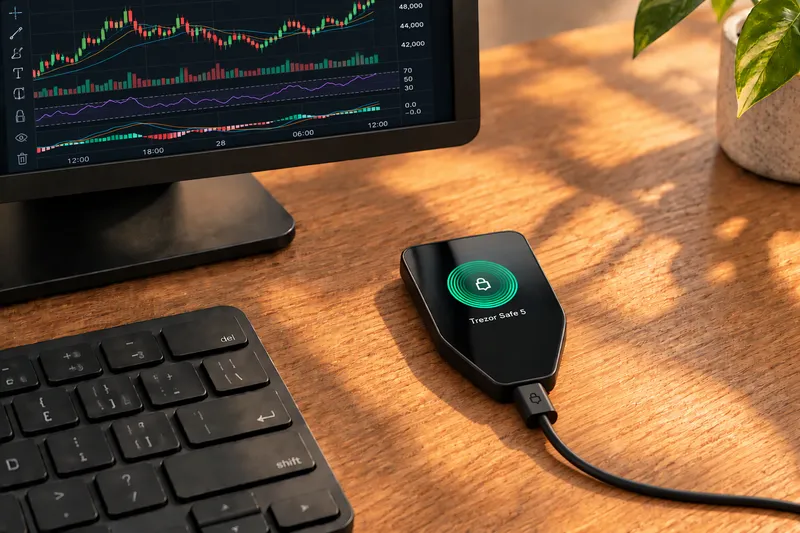
The Trezor Safe 5 is a compact and lightweight hardware wallet, measuring approximately 2.59 × 1.57 × 0.31 inches (65.9 × 40 × 8 mm) and weighing just 23 grams (0.81 oz). It has a 1.54-inch color touchscreen with a resolution of 240 × 240 pixels, protected by Gorilla Glass 3. Haptic feedback provides tactile confirmation when interacting with the device.
Its body combines durable PC-ABS plastic, a tamper-evident casing and anodised aluminium backplates. The device is designed to be portable and practical for everyday use, while its touchscreen makes it easier to inspect transaction details than on hardware wallets with small monochrome displays and physical buttons.
The Trezor Safe 5 connects through a USB-C cable, which is included in the package. It has no Bluetooth connection and is not air-gapped: it communicates electronically with the computer or compatible smartphone when connected. This is an important distinction for users comparing different types of cold wallet for cryptocurrency.
Security: NDA-Free EAL6+ secure element
Security is one of the strongest aspects of the Trezor Safe 5. The device uses an OPTIGA Trust M (V3) Secure Element, certified to Common Criteria EAL6+. This specialised chip provides additional protection for sensitive information and helps resist sophisticated physical and software-based attacks.
An interesting aspect of this component is its NDA-free approach. Unlike some secure elements whose technical documentation is restricted by non-disclosure agreements, this chip allows public security research without requiring an NDA. This is consistent with Trezor’s broader emphasis on transparency and open-source development.
The device also offers PIN and passphrase protection, with sensitive operations and confirmations performed directly on its touchscreen. The USB connection means that the Safe 5 is not completely isolated from an internet-connected computer, but the private keys remain protected by the hardware wallet and are not simply handed over to the connected software.
There is no Bluetooth connection, which removes one potential wireless communication channel. Overall, the combination of a certified Secure Element, on-device confirmation and transparent software design makes the Trezor Safe 5 an interesting option for security-conscious cryptocurrency holders.
Multi-share backup: an interesting recovery system
One of the most useful features of the Trezor Safe 5 is its Multi-share Backup, based on the SLIP39 standard, also known as Shamir’s Secret Sharing.
Instead of relying on a single recovery phrase, this system divides the wallet backup into several separate shares. Each share consists of a list of 20 words. During setup, users choose how many shares to create and how many are required to restore the wallet.
For example, with a 3-of-5 configuration, five separate 20-word shares are generated, but only three are needed to recover access. This means that two shares can be lost or damaged without making the wallet unrecoverable.
This is particularly interesting for people who want to distribute recovery information across different secure locations rather than keeping everything in one place. It also reduces the risk that someone who finds a single share will automatically gain access to the wallet.
Another useful feature in Trezor Suite is the backup check, which allows users to test whether their recovery backup is correct without having to erase or restore the wallet. This is a practical way to verify that the recovery information has been recorded accurately and can be used if the device is lost or damaged.
However, Multi-share Backup requires careful organisation. If too many shares are lost, the recovery threshold can no longer be met. Users should also verify their backup and keep all shares private and physically protected.
Trezor Suite: a friendly desktop application
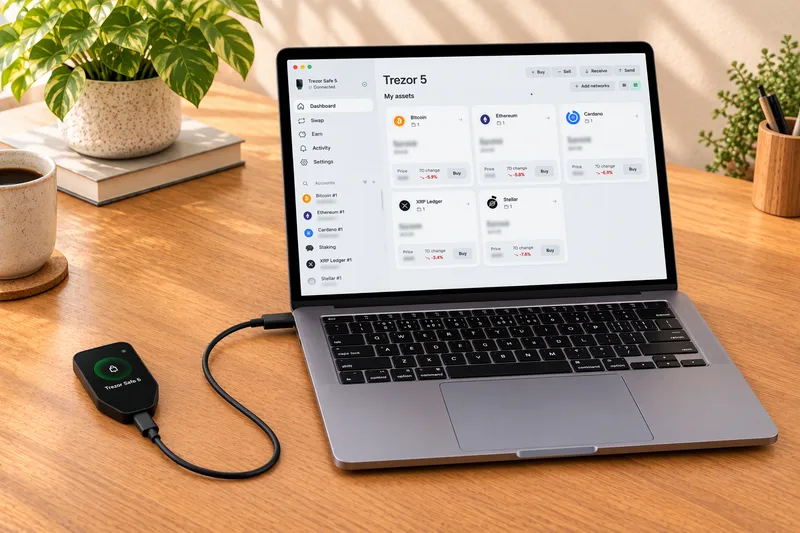
The Trezor Safe 5 works with Trezor Suite, the manufacturer’s official application. One of its main advantages is its straightforward interface, which allows users to manage their portfolio, check balances, view transaction history and send or receive supported cryptocurrencies.
The application also offers additional functions, including buying, selling, swapping and staking selected assets, depending on the cryptocurrency and available service providers. In particular, staking is available for popular cryptocurrencies such as Ethereum (ETH), Cardano (ADA), Solana (SOL) and Tron (TRX). This gives users the opportunity to participate in selected blockchain staking services while keeping control of their wallet’s private keys.
For people who prefer working on a computer rather than a smartphone, the desktop experience is a significant advantage. The Safe 5 connects through USB-C, and each transaction must be confirmed on the hardware device. This provides an additional opportunity to inspect the recipient address and transaction details before approving an operation.
Supported cryptocurrencies and third-party wallets
Trezor supports a large range of cryptocurrencies, but there is an important distinction between assets that are directly available in Trezor Suite and those that require a third-party wallet application.
Popular cryptocurrencies and many widely used tokens can be managed directly through the official software. However, some less common assets and blockchain networks are not immediately accessible in Trezor Suite, even when the hardware device supports them.
In these cases, users can connect the Safe 5 to compatible third-party applications such as MetaMask, Exodus, OKX Wallet, NuFi or Nightly. These applications provide an additional interface for accessing supported networks and tokens.
This arrangement requires a little more preparation. Users need to install and configure the appropriate third-party wallet application, connect the Trezor device and check that the desired network and asset are supported. It is also sensible to test the setup with a small transaction before transferring substantial funds. The device connects with these hot wallets, but surely it takes some time to set all up, while wallets like Tangem or Ellipal Titan 2.0 give immediate access to tokens in their own app.
Importantly, connecting a third-party application does not mean that the private keys have to be moved into a hot wallet. They remain protected by the Trezor device, which signs transactions. Nevertheless, using additional software introduces another interface that users must understand and verify.
Android and iPhone compatibility
The Trezor Safe 5 can connect to Android smartphones, offering an alternative to managing the wallet through a computer. This is useful for people who want to check and manage their cryptocurrency while travelling.
However, iPhone compatibility is more limited. On iOS, users can check portfolio balances, buy supported cryptocurrencies and receive funds, but they cannot use the full range of functions. Sending and swapping cryptocurrency, setting up the wallet and managing the hardware device require a compatible desktop setup. Therefore, iPhone users who want complete mobile functionality should consider this limitation before purchasing.
Final verdict: is the Trezor Safe 5 a good cold wallet?
The Trezor Safe 5 is a well-rounded cold wallet crypto solution for users who value security, transparency and convenient desktop management. Its NDA-free EAL6+ Secure Element and Multi-share Backup system are particularly interesting features, offering a strong combination of hardware protection and flexible recovery options.
Its desktop application is another major advantage. The ability to check a recovery backup and access staking for popular cryptocurrencies such as ETH, ADA, SOL and TRX adds further practical value. However, the need for third-party wallets to access certain less common cryptocurrencies makes the experience less immediate than with some competing devices.
Overall, the Trezor Safe 5 is a strong choice for investors who primarily manage their cryptocurrency on a computer and appreciate advanced backup options. Android users can also benefit from mobile connectivity, while iPhone owners should be aware of the reduced functionality.
Frequently asked questions about Trezor Safe 5
1. Does Trezor Safe 5 work with iPhone (iOS)?
Yes, Trezor Safe 5 offers limited compatibility with iPhones. On iOS, users can access view-only portfolio tracking, buy cryptocurrencies and receive funds. However, sending transactions and managing the hardware wallet require a desktop computer or a compatible Android device. Therefore, iPhone users who want full control over their wallet should be aware of these limitations before purchasing.
2. Does Trezor Safe 5 come with a debit card?
No. Trezor Safe 5 does not include an associated debit card or payment card. It is a hardware wallet designed to store and manage cryptocurrency securely, rather than a banking or payment product. You can use Trezor Suite to manage your crypto assets and access supported services, but spending cryptocurrency directly with a Trezor-branded debit card is not a built-in feature.
3. Does this device allow swapping tokens?
Yes. Trezor Safe 5 supports cryptocurrency swaps through Trezor Suite, using integrated third-party exchange services. The available coins, trading pairs, fees and exchange rates depend on the providers and may vary. It is quite useful for traders who want to exchange funds quickly. The device connects to a computer using a USB-C cable and does not have Bluetooth or Wi-Fi connectivity. Unlike air-gapped QR-code wallets, it is not designed to remain physically disconnected during transaction signing.
4. Which cryptocurrencies can you stake on Trezor Safe 5?
Through Trezor Suite, users can access staking options for selected cryptocurrencies, including Ethereum (ETH), Cardano (ADA), Solana (SOL) and Tron (TRX). Staking availability and the process may depend on the network and the service provider integrated into the application. Before staking, it is important to check applicable fees, lock-up or unbonding periods, and any associated risks.
5. Does Trezor Safe 5 offer biometric identification?
Trezor Safe 5 does not have a built-in fingerprint reader or facial recognition system. However, biometric authentication is available through the mobile device used with Trezor Suite. Depending on the device and operating system, users may be able to use Apple Touch ID, Face ID or Windows Hello to verify the funds, with a PIN fallback where supported.
However biometrics cannot approve or sign cryptocurrency transactions. Signing still requires the physical Trezor device, and the appropriate device authentication, such as a PIN or passphrase when required. Transactions must be confirmed directly on the Trezor Safe 5 touchscreen, keeping the hardware wallet at the centre of transaction security.